Disti Bomma hanging on the desktop (Mac and Windows)

Install HangLine, open Settings, go to Ornaments and pick Ash gourd or Chilli ristra. It hangs from a thread at the top of your screen and swings there all day on real pendulum physics. Your clicks pass straight through it, so it never blocks the window behind it. Free on Mac, Windows and Linux, and you can hang a photo of your own bomma instead if you have one.
A disti bomma is a thing you hang. That is the whole point of it. You tie it above a door, on a terrace, on the front of a lorry, somewhere it will be seen first. So here is a fair question for anyone who now spends nine hours a day looking at a screen rather than a doorway: can you have a disti bomma hanging on the desktop as well? On Mac and Windows, yes. This is how, and it takes about a minute.
What a disti bomma actually is
Disti bomma, written drishti bomma in Telugu, drishti bommai in Tamil and drishti gombe in Kannada, is a face made to be stared at. Bulging eyes, bared teeth, a tongue out, usually painted in red and yellow and black. You see them on half built houses, on water tanks, on gates and on the back of trucks. The thinking behind it is old and very plain. Attention is not free. Put something loud where the first look lands, and it takes that look instead of you.
Two other things get hung for exactly the same reason, and most people know these better than the mask.
- The ash gourd. Boodida gummadikaya in Telugu, the big pale white one, tied up at the entrance of a new house or a new shop. It is heavy, it is impossible to miss, and that is the job.
- The chillies and the lemon. Nimbu mirchi, a string of green chillies, usually seven of them, with a lemon tied at the bottom. It goes on the doorway of a shop or the front of a vehicle, and a fresh one replaces it about once a week.
Different objects, one idea. Something hangs in plain sight so that you do not have to.
Why the desktop is the new doorway
The doorway moved. Most of the day now happens on a screen, and that screen is where your work is judged, where the numbers land, where people see what you made. If a shop gets a lemon on its door, your screen has a reasonable claim to one too.
There is a second reason, and it is the honest one. It looks lovely. A chilli string swinging gently above your browser tabs is a nice thing to catch out of the corner of your eye at four in the afternoon.
How to hang a disti bomma on your desktop
HangLine is a free desktop app. It pins a thread to the top edge of your screen and hangs one ornament from it. The swing is a real pendulum simulation, so it settles, it reacts when you flick it, and it drifts in a light breeze if you ask it to. Here is the whole process.
- Download and install HangLine. There is a Mac version, a Windows version and a Linux version on the download page. Windows users can also install it from the Microsoft Store.
- Open Settings. On Mac, click the HangLine icon in the menu bar at the top right. On Windows, click the HangLine icon in the system tray at the bottom right. Choose Settings.
- Go to Ornaments and open the Classic pack. Everything is free, so nothing is locked.
- Pick Ash gourd or Chilli ristra. It appears on the thread straight away.
- Choose a thread and a motion. Twine looks closest to the real thing. For motion, Gentle breeze keeps it alive without ever going still, which is the closest match to a real one hanging outside.
- Drag it where you want it. Move it along the top of the screen and leave it wherever it sits best for you, usually off to one side so your windows stay clear.
The two ornaments that already do this job
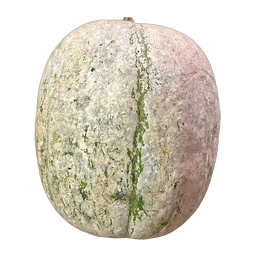
Ash gourd
The heaviest ornament in the app. Heavy things swing slowly and settle quickly, so this one moves in long lazy arcs and comes to rest with a soft thud sound. It is a photograph, not a drawing, so the thread ties directly into the fruit.
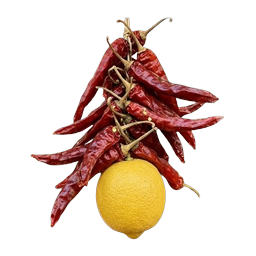
Chilli ristra
Dried red chillies bunched above a lemon, light enough to keep moving for a long time after you nudge it. On the breeze motion it never quite stops, the way the real one never quite does on a shop door.
Or hang your own bomma
If your family has a particular bomma, or your shop has the one that has been on the door since your father ran it, photograph it and hang that instead. In Settings, open Ornaments and choose Yours. It takes a PNG, a JPG, an SVG, an animated GIF, or a 3D object in .glb form that will turn slowly on the thread.
One tip that makes a real difference: use a PNG with a transparent background. The app ties its thread into the top of the picture you give it, so if the picture still has a white square around it, the thread appears to tie into the square rather than into the bomma.
It will not get in your way
This is the part people ask about before they install anything that floats on top of their screen.
- Your mouse clicks pass straight through to the window behind it. Only the ornament itself catches a click.
- It never takes keyboard focus and never opens a window on its own.
- It draws one small animation and sleeps when nothing is moving, so it does not eat your battery.
- Every sound can be switched off, and so can the floating, if you would rather it sat behind your windows.
- Hide it or quit it from the menu bar on Mac or the system tray on Windows whenever you want.
And while it is up there, it can carry your tasks. Add one and a gold ring drops onto the thread above the ornament. The ring stays until the task is done. So the same thread that holds your bomma holds the three things you owe someone today.
What it costs
Nothing. Every ornament, every thread, every motion style and the task rings are all included, on macOS, Windows and Linux. There is a free account, and it exists for one reason, which is to let the app remember you on up to two computers. Your tasks, your settings and any picture you hang stay on your own machine and are never uploaded.
Questions people ask
Is a disti bomma the same as a nazar battu?
They come from the same idea and do the same job. Disti bomma and drishti bommai are the southern names, most often for the fierce painted face. Nazar battu is the northern term and covers the whole family of them, including the lemon and chillies.
Which one should I pick, the gourd or the chillies?
If you want something calm at the edge of your vision, take the ash gourd, because it barely moves. If you want a bit of life on the screen, take the chilli ristra, which keeps swinging.
Can I have it on two computers?
Yes, a free account covers two, so the Mac at home and the Windows machine at the office can both have one.
Will it show up in a screen share?
Yes, it is drawn on your screen, so anyone watching a shared screen sees it. Hide it from the menu bar or tray before a call if you would rather keep it to yourself.
Does it work on a second monitor?
Yes. Drag it onto whichever display you want it on and it stays there.
A note on the tradition: nothing here is a claim about what a disti bomma does. It is simply a thing people hang, HangLine is an app for hanging things, and the two suited each other. If you keep the custom, you already know why. If you just like the look of a chilli string swinging above your browser tabs, that is a good enough reason as well. Background reading on the custom: Drishti bommai and Evil eye.